Switch
Definition
It represents an ideal switch, a lossless element that connects two buses.
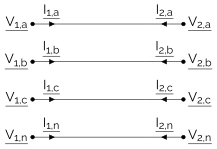
Equations
The associated equations are the following for a closed switch:
and for an open switch:
Available Results
The following results are available for all switches:
Result Accessor |
Default Unit |
Type |
Description |
|---|---|---|---|
|
\(V\) |
2 complex arrays |
The potentials of each phase of the switch |
|
\(A\) |
2 complex arrays |
The currents flowing into each phase of the switch |
|
\(V\!A\) |
2 complex arrays |
The powers flowing into each phase of the switch |
|
\(V\) |
2 complex arrays |
The phase-to-neutral voltages if the switch has a neutral, the phase-to-phase voltages otherwise |
Note
These result accessors contain tuples for the results of the first and second sides of the switch.
These are the old accessors to the results of the sides of the switch. They may be deprecated in the
future. The new interface is to use <side>.res_* presented below.
The following results are available on each side of the switch accessible with <side>. prefix where <side> is either
side1 or side2:
Result Accessor |
Default Unit |
Type |
Description |
|---|---|---|---|
|
\(V\) |
complex array |
The potentials of each phase of the corresponding switch side |
|
\(A\) |
complex array |
The currents flowing into each phase of the corresponding switch side |
|
\(V\!A\) |
complex array |
The powers flowing into each phase of the corresponding switch side |
|
\(V\) |
complex array |
The voltages of the corresponding switch side: phase-to-neutral if it has a neutral, phase-to-phase otherwise |
And the following results are available for switches with a neutral and at least one phase:
Result Accessor |
Default Unit |
Type |
Description |
|---|---|---|---|
|
\(V\) |
complex array |
The phase-to-neutral voltages of the corresponding switch side |
|
\(\mathrm{pu}\) |
number array |
The voltage levels of each phase of the corresponding switch side (\(\sqrt{3} V_{pn} / V_\mathrm{nom}\)) |
And the following results are available for switches with more than one phase:
Result Accessor |
Default Unit |
Type |
Description |
|---|---|---|---|
|
\(V\) |
complex array |
The phase-to-phase voltages of the corresponding switch side |
|
\(\mathrm{pu}\) |
number array |
The voltage levels of each phase of the corresponding switch side (\(V_{pp} / V_\mathrm{nom}\)) |
And the following results are available for three-phase switches:
Result Accessor |
Default Unit |
Type |
Description |
|---|---|---|---|
|
\(\%\) |
number |
The voltage unbalance of the corresponding switch side according to the IEC, IEEE or NEMA definition |
|
\(\%\) |
number |
The Current Unbalance Factor (CUF) of the switch side |
Usage
Here is a switch connecting a constant power load to a voltage source.
import functools as ft
import numpy as np
import roseau.load_flow as rlf

# Two buses
bus1 = rlf.Bus(id="bus1", phases="abcn")
bus2 = rlf.Bus(id="bus2", phases="abcn")

# A switch connecting the two buses
switch = rlf.Switch(id="switch", bus1=bus1, bus2=bus2)

# A voltage source on the first bus
vs = rlf.VoltageSource(id="source", bus=bus1, voltages=400 / rlf.SQRT3)

# The potential of the neutral of bus1 is fixed at 0V
pref = rlf.PotentialRef(id="pref", element=bus1)

# An unbalanced constant-power load on the second bus
load = rlf.PowerLoad(id="load", bus=bus2, powers=[5000 + 1600j, 2500 + 800j, 0])

# Create a network and solve a load flow
en = rlf.ElectricalNetwork.from_element(bus1)
en.solve_load_flow()

# The current flowing into the switch from bus1
en.res_switches[["current1"]].transform([np.abs, ft.partial(np.angle, deg=True)])
# |                 |   ('current1', 'absolute') |   ('current1', 'angle') |
# |:----------------|---------------------------:|------------------------:|
# | ('switch', 'a') |                    22.7321 |                -17.7447 |
# | ('switch', 'b') |                    11.3661 |               -137.745  |
# | ('switch', 'c') |                     0      |                  0      |
# | ('switch', 'n') |                    19.6866 |                132.255  |

# The current flowing into the switch from bus2
en.res_switches[["current2"]].transform([np.abs, ft.partial(np.angle, deg=True)])
# |                 |   ('current2', 'absolute') |   ('current2', 'angle') |
# |:----------------|---------------------------:|------------------------:|
# | ('switch', 'a') |                    22.7321 |                162.255  |
# | ('switch', 'b') |                    11.3661 |                 42.2553 |
# | ('switch', 'c') |                     0      |                  0      |
# | ('switch', 'n') |                    19.6866 |                -47.7447 |

# The two currents are equal in magnitude and opposite in phase, as expected

# The two buses have the same voltages
en.res_buses_voltages[["voltage"]].transform([np.abs, ft.partial(np.angle, deg=True)])
# |                |   ('voltage', 'absolute') |   ('voltage', 'angle') |
# |:---------------|--------------------------:|-----------------------:|
# | ('bus1', 'an') |                    230.94 |                      0 |
# | ('bus1', 'bn') |                    230.94 |                   -120 |
# | ('bus1', 'cn') |                    230.94 |                    120 |
# | ('bus2', 'an') |                    230.94 |                      0 |
# | ('bus2', 'bn') |                    230.94 |                   -120 |
# | ('bus2', 'cn') |                    230.94 |                    120 |

# The switch is closed by default. Let's open it and add a line

switch.open()
lp = rlf.LineParameters(id="LP", z_line=(0.1 + 0.1j) * np.eye(4))
rlf.Line(id="line", bus1=bus1, bus2=bus2, length=0.1, parameters=lp)
en.solve_load_flow()
# No current flows through the switch now
en.res_switches[["current1"]].transform([np.abs, ft.partial(np.angle, deg=True)])
# |                 |   ('current1', 'absolute') |   ('current1', 'angle') |
# |:----------------|---------------------------:|------------------------:|
# | ('switch', 'a') |                          0 |                       0 |
# | ('switch', 'b') |                          0 |                       0 |
# | ('switch', 'c') |                          0 |                       0 |
# | ('switch', 'n') |                          0 |                       0 |
API Reference
- class Switch(id: Id, bus1: roseau.load_flow.models.buses.Bus, bus2: roseau.load_flow.models.buses.Bus, *, phases: str | None = None, closed: bool = True, geometry: shapely.geometry.base.BaseGeometry | None = None)
Bases:
roseau.load_flow.models.branches.AbstractBranch[SwitchSide, roseau.load_flow_engine.cy_engine.CySwitch | roseau.load_flow_engine.cy_engine.CyOpenSwitch]A general purpose switch branch.
Switch constructor.
- Parameters:
id – A unique ID of the switch in the network switches.
bus1 – Bus to connect to the switch.
bus2 – Bus to connect to the switch.
phases – The phases of the switch. A string like
"abc"or"an"etc. The order of the phases is important. For a full list of supported phases, see the class attributeallowed_phases. All phases of the switch must be present in the phases of both connected buses. By default, the phases common to both buses are used.closed – Whether the switch is closed or not. If
True(default), the switch is closed and the current can flow through it. IfFalse, the switch is open and no current can flow through it.geometry – The geometry of the switch.
- element_type: Final = 'switch'
The type of the element. It is a string like
"load"or"line"etc.
- allowed_phases: Final
The allowed phases for a switch are:
P-P-P or P-P-P-N:
"abc","abcn"P-P or P-P-N:
"ab","bc","ca","abn","bcn","can"P or P-N:
"a","b","c","an","bn","cn"N:
"n"
- property phases: str
The phases of the switch. This is an alias for
phases1andphases2.
- property closed: bool
Whether the switch is closed or not.
- open() None
Open the switch.
- close() None
Close the switch.
- geometry
- property side1: _Side_co
The first side of the branch.
- property side2: _Side_co
The second side of the branch.
- property phases1: str
The phases of the branch at the first bus.
- property phases2: str
The phases of the branch at the second bus.
- property bus1: roseau.load_flow.models.buses.Bus
The first bus of the branch.
- property bus2: roseau.load_flow.models.buses.Bus
The second bus of the branch.
- property res_currents: tuple[Q_[ComplexArray], Q_[ComplexArray]]
The load flow result of the branch currents (A).
- property res_powers: tuple[Q_[ComplexArray], Q_[ComplexArray]]
The load flow result of the branch powers (VA).
- property res_potentials: tuple[Q_[ComplexArray], Q_[ComplexArray]]
The load flow result of the branch potentials (V).
- property res_voltages: tuple[Q_[ComplexArray], Q_[ComplexArray]]
The load flow result of the branch voltages (V).
- classmethod from_dict(data: JsonDict, *, include_results: bool = True) Self
Create an element from a dictionary created with
to_dict().Note
This method does not work on all classes that define it as some of them require additional information to be constructed. It can only be safely used on the ElectricNetwork, LineParameters and TransformerParameters classes.
- Parameters:
data – The dictionary containing the element’s data.
include_results – If True (default) and the results of the load flow are included in the dictionary, the results are also loaded into the element.
- Returns:
The constructed element.
- is_multi_phase: Final = True
Is the object multi-phase?
- property network: _N_co | None
Return the network the element belong to (if any).
- id
- classmethod from_json(path: StrPath, *, include_results: bool = True) Self
Construct an element from a JSON file created with
to_json().Note
This method does not work on all classes that define it as some of them require additional information to be constructed. It can only be safely used on the ElectricNetwork, LineParameters and TransformerParameters classes.
- Parameters:
path – The path to the network data file.
include_results – If True (default) and the results of the load flow are included in the file, the results are also loaded into the element.
- Returns:
The constructed element.
- to_dict(*, include_results: bool = True) JsonDict
Convert the element to a dictionary.
- Parameters:
include_results – If True (default), the results of the load flow are included in the dictionary. If no results are available, this option is ignored.
- Returns:
A JSON serializable dictionary with the element’s data.
- to_json(path: StrPath, *, include_results: bool = True) Path
Save this element to a JSON file.
Warning
If the file exists, it will be overwritten.
- Parameters:
path – The path to the output file to write the network to.
include_results – If True (default), the results of the load flow are included in the JSON file. If no results are available, this option is ignored.
- Returns:
The expanded and resolved path of the written file.
- results_to_dict(full: bool = False) JsonDict
Return the results of the element as a dictionary.
The results dictionary of an element contains the ID of the element, its phases, and the result. For example, bus.results_to_dict() returns a dictionary with the form:
{"id": "bus1", "phases": "an", "potentials": [[230.0, 0.0], [0.0, 0.0]]}
Note that complex values (like potentials in the example above) are stored as list of [real part, imaginary part] so that it is JSON-serializable
Using the full argument, bus.results_to_dict(full=True) leads to the following results:
{"id": "bus1", "phases": "an", "potentials": [[230.0, 0.0], [0.0, 0.0]], "voltages": [[230.0, 0.0]]}
The results dictionary of the network contains the results of all of its elements grouped by the element type. It has the form:
{
    "buses": [bus1_dict, bus2_dict, ...],
    "lines": [line1_dict, line2_dict, ...],
    "transformers": [transformer1_dict, transformer2_dict, ...],
    "switches": [switch1_dict, switch2_dict, ...],
    "loads": [load1_dict, load2_dict, ...],
    "sources": [source1_dict, source2_dict, ...],
    "grounds": [ground1_dict, ground2_dict, ...],
    "potential_refs": [p_ref1_dict, p_ref2_dict, ...],
}
where each dict is produced by the element’s results_to_dict() method.
- Parameters:
full – If True, all the results are added in the resulting dictionary. False by default.
- Returns:
The dictionary of results.
- results_to_json(path: StrPath, *, full: bool = False) Path
Write the results of the load flow to a json file.
Warning
If the file exists, it will be overwritten.
- Parameters:
path – The path to the output file to write the results to.
full – If True, all the results are added in the resulting dictionary, including results computed from other results (such as voltages that could be computed from potentials). False by default.
- Returns:
The expanded and resolved path of the written file.