Data Exchange
roseau-load-flow provides some converters for data exchange from other known power system simulation tools.
Power Factory
Importing PowerFactory networks in roseau-load-flow can be done using the DIgSILENT Interface for Geographical
Information Systems (DGS) JSON format.
The following components are currently supported:
Name |
Description |
RLF Element |
|---|---|---|
ElmXnet |
External Grid |
VoltageSource |
ElmTerm |
Terminal |
Bus |
StaCubic |
Cubicle |
N/A |
ElmTr2 |
2-Winding Transformer |
Transformer |
TypTr2 |
2-Winding Transformer Type |
TransformerParameters |
ElmCoup |
Switch |
Switch |
ElmLne |
Line/Cable |
Line |
TypLne |
Line/Cable Type |
LineParameters |
ElmLodLV |
Load, low voltage |
PowerLoad (P>=0) |
ElmLodmv |
Load, medium voltage |
PowerLoad (P>=0 or P<0) |
ElmLod |
General load |
PowerLoad (P>=0) |
ElmGenStat |
Static Generator |
PowerLoad (P<=0) |
ElmPvsys |
PV System |
PowerLoad (P<=0) |
Export from PowerFactory
roseau-load-flow provides an “Export Definition Folder” to configure the DGS export in the form of a pfd file called
DGS-RLF.pfd. This file contains a “Monitor Variable” (IntMon) object for each class that should be exported.
Use the
ElectricalNetwork.dgs_export_definition_folder_path()
method to get the location of this file:
>>> print(rlf.ElectricalNetwork.dgs_export_definition_folder_path())
/home/my_user/my_project/.venv/lib/python3.12/site-packages/roseau/load_flow/data/io/DGS-RLF.pfd
Then drag-and-drop this file into your PowerFactory project to use it as “Export Definition Folder”.
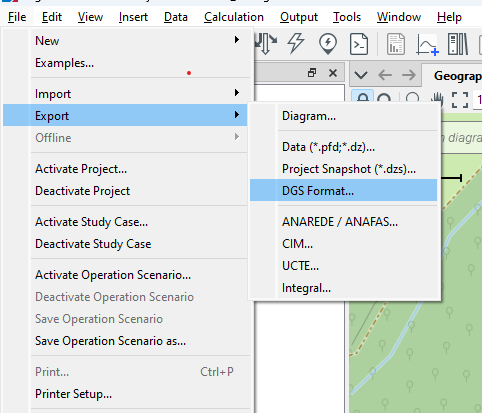
With the folder now available in PowerFactory, make sure you have your project activated then export the network to DGS,
click on the File menu then hover over Export and choose DGS Format... from the list like so:
A “DGS-Export” window will open, set the “Export Options” and “Export Definition” as shown in the following picture:
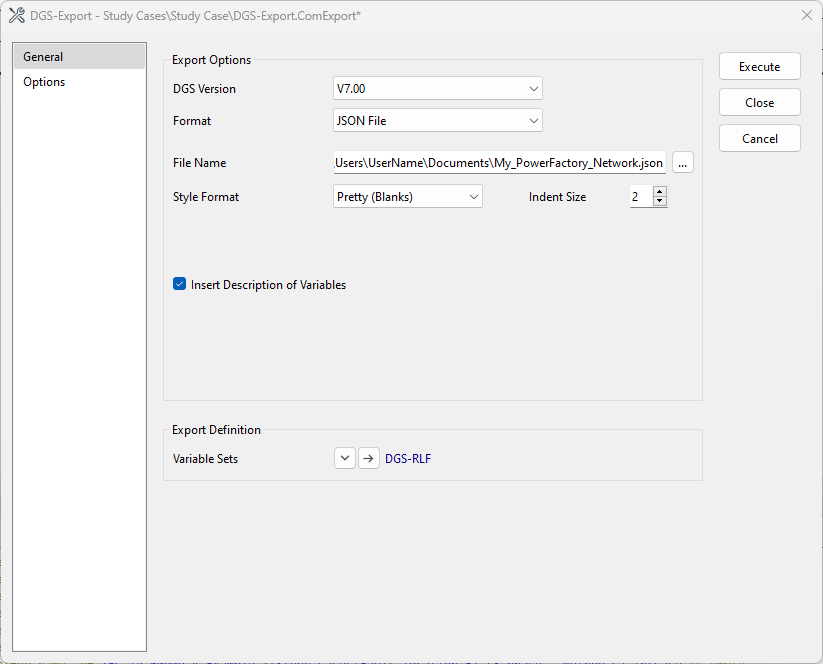
Note that the “Variable Sets” field in the “Export Definition” section is set to the DGS-RLF file provided by
roseau-load-flow.
Click on Execute to finish the export.
Import into Roseau Load Flow
To import a PowerFactory network in roseau-load-flow, use the
ElectricalNetwork.from_dgs() method:
>>> rlf.ElectricalNetwork.from_dgs("my_dgs_network.json")
<ElectricalNetwork: 6 buses, 5 branches, 8 loads, 1 source, 1 ground, 1 potential ref>
Limitations
Please note that there are some limitations in the supported features:
Required elements: the network is expected to have at least one of the following elements:
External Grid (
ElmXnet)Terminal (
ElmTerm)Cubicle (
StaCubic)
Ignored elements: elements that are not mentioned in the table above are ignored;
Ignored attributes: functionality that is not yet available in
roseau-load-flowis ignored. This includes the state of the switches (switches are considered to be always closed);
Lines and Transformers
In addition to the DGS import support, roseau-load-flow supports creating lines and transformers parameters from
PowerFactory data. This is useful when you don’t want to import a whole network but would like to use some of the lines
and transformers models you have in a power factory project.
Lines
To create line parameters from a PowerFactory Line Type (TypLne) object, use the
LineParameters.from_power_factory() method.
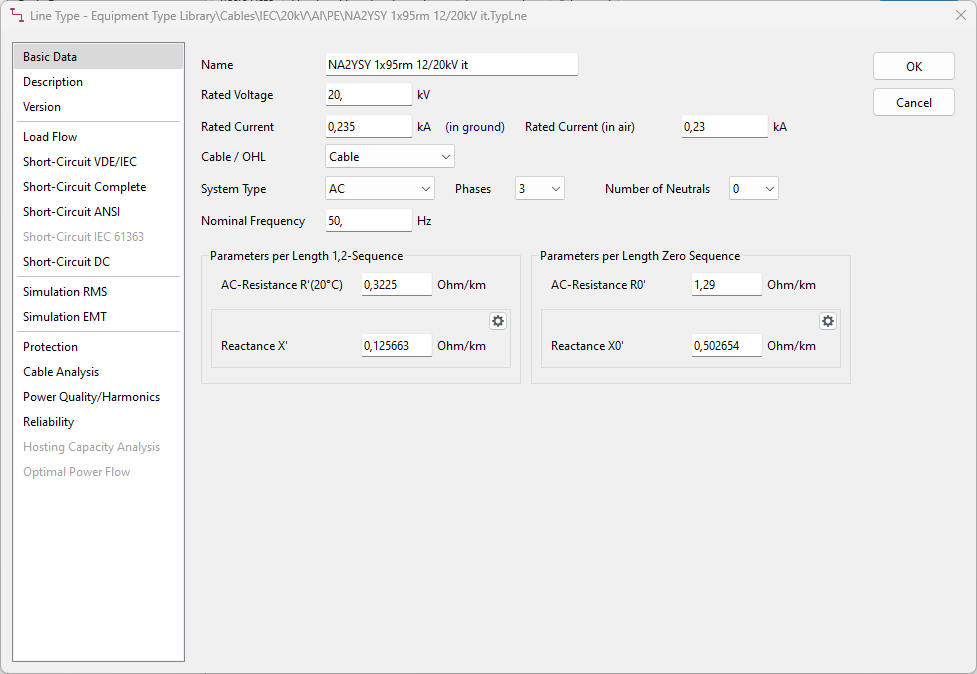
The parameters of a line type can be found in two different panels on the graphical user interface of PowerFactory:
the “Basic Data” panel as shown in the figure below
the “Load Flow” panel as shown in the figure below
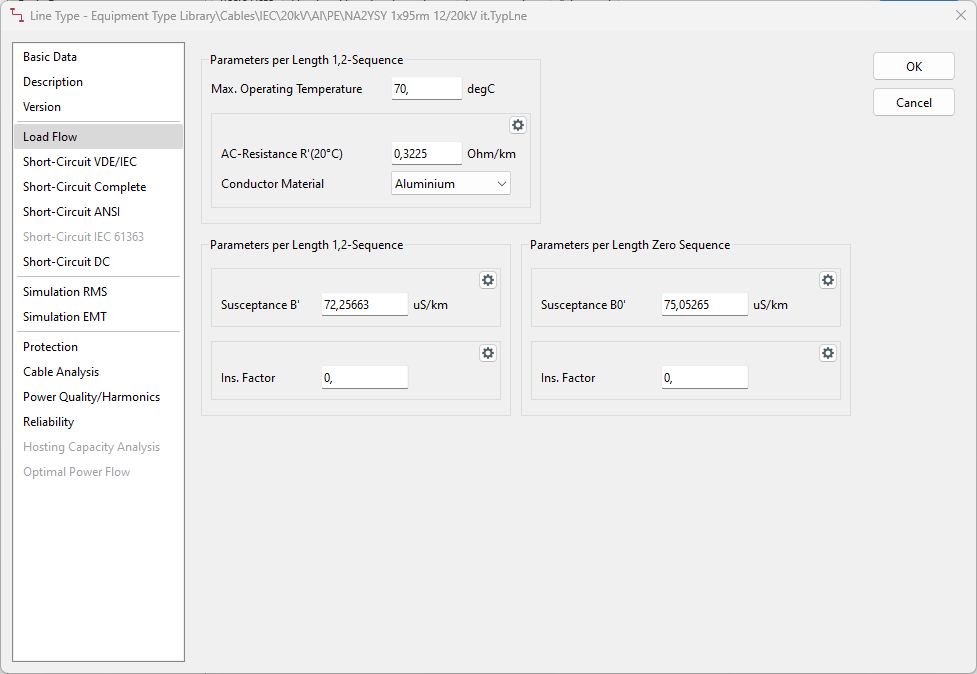
The data on these two screenshots translate to:
>>> rlf.LineParameters.from_power_factory(
...     id="NA2YSY 1x95rm 12/20kV it",
...     r0=rlf.Q_(1.29, "ohm/km"),  # Parameters per Length Zero Sequence, "Basic data"
...     r1=rlf.Q_(0.3225, "ohm/km"),  # Parameters per Length 1,2 Sequence, "Basic data"
...     x0=rlf.Q_(0.502654, "ohm/km"),  # Parameters per Length Zero Sequence, "Basic data"
...     x1=rlf.Q_(0.125663, "ohm/km"),  # Parameters per Length 1,2 Sequence, "Basic data"
...     b0=rlf.Q_(75.05265, "uS/km"),  # Parameters per Length Sero Sequence, "Load Flow"
...     b1=rlf.Q_(72.25663, "uS/km"),  # Parameters per Length 1,2 Sequence, "Load Flow"
...     nphase=3,  # Phases, "Basic Data"
...     nneutral=0,  # Number of Neutrals, "Basic Data"
...     inom=rlf.Q_(0.235, "kA"),  # Rated Current, "Basic Data"
...     cohl="Cable",  # Cable/OHL, "Basic Data"
...     conductor="Al",  # Conductor Material, "Load Flow"
... )
Transformers
To create transformer parameters from a PowerFactory 2-Winding Transformer Type (TypTr2) object, use the
TransformerParameters.from_power_factory() method.
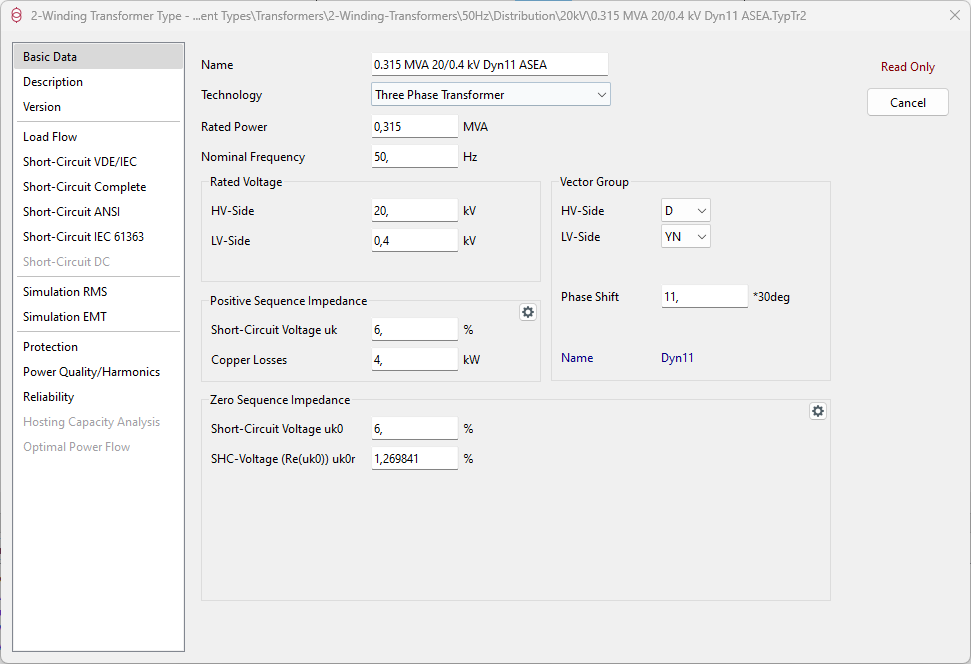
The parameters of a 2-winding transformer can be found in two different panels on the graphical user interface of PowerFactory:
the “Basic Data” panel as shown in the figure below
the “Load Flow” panel as shown in the figure below
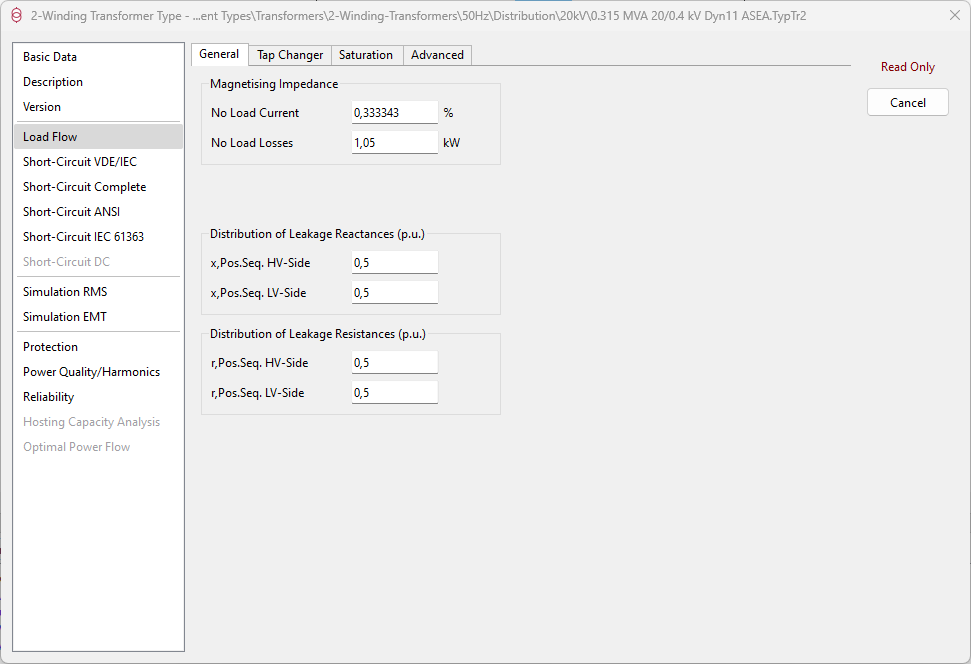
The data on these two screenshots translate to:
>>> tp = rlf.TransformerParameters.from_power_factory(
...     id="0.315 MVA 20/0.4 kV Dyn11 ASEA",
...     tech="three-phase",  # Technology, "Basic Data"
...     sn=rlf.Q_(0.315, "MVA"),  # Rated Power, "Basic Data"
...     uhv=rlf.Q_(20, "kV"),  # Rated Voltage HV-Side, "Basic Data"
...     ulv=rlf.Q_(0.4, "kV"),  # Rated Voltage LV-Side, "Basic Data"
...     vg_hv="D",  # Vector Group HV-Side, "Basic Data"
...     vg_lv="yn",  # Vector Group LV-Side, "Basic Data"
...     phase_shift=11,  # Vector Group Phase Shift, "Basic Data"
...     uk=rlf.Q_(6, "%"),  # Positive Sequence Impedance Short-Circuit Voltage, "Basic Data"
...     pc=rlf.Q_(4, "kW"),  # Positive Sequence Impedance Copper Losses, "Basic Data"
...     curmg=rlf.Q_(0.333343, "%"),  # Magnetizing Impedance - No Load Current, "Load Flow"
...     pfe=rlf.Q_(1.05, "kW"),  # Magnetizing Impedance - No Load Losses, "Load Flow"
... )
OpenDSS
roseau-load-flow supports creating lines and transformers from OpenDSS data.
Lines
To create line parameters from an OpenDSS LineCode object, use the
LineParameters.from_open_dss() method. For example, the DSS
command New linecode.240sq nphases=3 R1=0.127 X1=0.072 R0=0.342 X0=0.089 units=km translates to:
>>> lp = rlf.LineParameters.from_open_dss(
...     id="240sq",
...     nphases=3,  #  creates 3x3 Z,Y matrices
...     r1=Q_(0.127, "ohm/km"),
...     x1=Q_(0.072, "ohm/km"),
...     r0=Q_(0.342, "ohm/km"),
...     x0=Q_(0.089, "ohm/km"),
...     c1=Q_(3.4, "nF/km"),  # default value used in OpenDSS code
...     c0=Q_(1.6, "nF/km"),  # default value used in OpenDSS code
... )
Transformers
To create a transformer from an OpenDSS 2-winding Transformer object, use the
TransformerParameters.from_open_dss() method to create
the transformer parameters. For example, the DSS command
DSSText.Command = "New transformer.LVTR Buses=[sourcebus, A.1.2.3] Conns=[delta wye] KVs=[11, 0.4] KVAs=[250 250] %Rs=0.00 xhl=2.5 %loadloss=0 "
translates to:
>>> tp_dss = rlf.TransformerParameters.from_open_dss(
...     id="LVTR-parameters",
...     conns=("delta", "wye"),
...     kvs=(11, 0.4),
...     kvas=(250, 250),  # alternatively pass a scalar `kvas=250`
...     leadlag="ansi",  # (Dyn1) or "euro" (Dyn11)
...     xhl=2.5,
...     loadloss=0,
...     noloadloss=0,  # default value used in OpenDSS
...     imag=0,  # default value used in OpenDSS
...     rs=0,  # redundant with `loadloss=0`
... )
>>> transformer = rlf.Transformer(
...     id="LVTR",
...     bus_hv=sourcebus,  # supposedly created already
...     bus_lv=A,  # supposedly created already
...     parameters=tp_dss,
... )
Roseau Load Flow (JSON)
roseau-load-flow defines a proprietary JSON format for the serialization of electrical networks. To write an
electrical network to a file, use the ElectricalNetwork.to_json()
method:
>>> en.to_json("my_network.json")
Warning
The to_json method will overwrite the file if it already exists.
To load the network from a JSON file, use the
ElectricalNetwork.from_json() method.
>>> en = rlf.ElectricalNetwork.from_json("my_network.json")
By default, the to_json and from_json methods will include the load flow results if they are available and valid. If
you want to save/load the network without the results, you can pass include_results=False to these methods.
Calling the to_json() method on a network with invalid results (say after an element has been modified) will raise an
exception. In this case, you can use the include_results=False option to ignore the results, or you can call the
solve_load_flow() method to update the results before saving the network.
You can include data specific to your tool in the JSON file using the
ElectricalNetwork.tool_data attribute. The data has to be JSON
serializable and is stored in a tool field in the JSON file. For example, you can add data like this:
>>> en.tool_data.add(
...     "rlf-extension",
...     {
...         "version": "1.0",
...         "last_modified": "2025-01-01",
...         "author": "John Doe",
...         "network_id": "EN-12345",
...     },
... )
This will add a tool field in the JSON file with the following content:
{
  "tool": {
    "rlf-extension": {
      "version": "1.0",
      "last_modified": "2025-01-01",
      "author": "John Doe",
      "network_id": "EN-12345"
    }
  }
}
The tool data can be accessed later when loading the network:
>>> en.tool_data["rlf-extension"]
{'version': '1.0',
 'last_modified': '2025-01-01',
 'author': 'John Doe',
 'network_id': 'EN-12345'}
Important
We do not recommend modifying the JSON file manually. The content of the JSON file is not
guaranteed to be stable across different versions of the library and should be considered an
implementation detail. Any changes to the JSON file should be done through the
ElectricalNetwork object otherwise it may lead to unexpected behavior.